My studying notebook

2009/05/08

App Engine TemplateSyntaxError

5/08/2009 06:17:00 AM Posted by Unknown , 1 comment
from google.appengine.ext.webapp import template

def HtmlRender(self, template_file, template_values):
temp = os.path.join(os.path.dirname(__file__),
'templates/'+template_file)
self.response.out.write( template.render(temp, template_values) )


template_values ={
'url' : self.request.url,
'my_dictionary' : { 'item1' : 1, 'item2' : 2}
}


url: {{ url }}
{% for key, value in my_dictionary.items %}
{{ item.key }} : {{ item.value }}
{% endfor %}


As you can see above code. you can app engine template to generate HTML than before generate code from within strings in the Python..

"TemplateSyntaxError: 'for' statements with five words should end in 'reversed': for key, value in my_dictionary.items".

Yes, you will get one error message. What? It looks as normal python code and seems does work. Because Google App Engine now support Django 0.96 version. If you want to receive a dictionary data type from python. You must modify Django template in HTML page.


more detail information:

2009/04/08

Free iPhone Application Programming by Apple & Stanford

4/08/2009 05:19:00 AM Posted by Unknown 1 comment
If you have a iPhone or iPod touch. You may install many apps form Apple App Store. It's very interesting and challenge a little bit [1].

When you enjoy these apps. Have you ever thought that you can try to develop some apps or games by yourself. If the answer is YES or you did it. Congratulation!!

Now, there is a good free iPhone Application Programming by Apple & Stanford. you can download the videos from Stanford on iTunes U and visite the CS193P iPhone Application Programming class by Stanford. Enjoying and try to do some interested apps!!!

  1. You can use AppSniper to track apps form app stroe on your iPhone or iPod touch. Or, you can visite AppShopper.com that you can track apps on web too.

2009/03/20

Let's Golf for iPhone

3/20/2009 10:12:00 PM Posted by Unknown No comments
Few dasy ago. gameloft announce a new golf game. after few months waitting. i bought it from app stroe right now. It's a nice golf game. You can enjoy palying golf even just use your fingers.


you can see more detial about Let's gold and others game made by gameloft

2009/02/23

Google Calendar Primary Calendar Change

2/23/2009 11:44:00 PM Posted by Unknown , 1 comment
Problem

when i add new calendar event in iPhone. There isn't another calendar that you choose. Default setting is primary calendar(the first calendar of your calendar lists). I often review the schedule and want to add in my wall street calendar in the Wall Street. How to Change the Google Calendar primary calendar.


Solution

When you log in your google calendar. you can see the calendar lists of Calendar Settings/Calendars. The first one (show in list is enable) is your primary calendar. You can't delete primary calendar or unsubscribe it. Maybe you had added some events in these two calendar. How to change your primary? 
  1. backup your calendar (export these calendars).
  2. delete the calendar that you want to change to primary calendar.
  3. delete the primary calendar (you can't delete this calendar truly. just clear events).
  4. this stage. you have two empty calendars.
  5. change the primary calendar name what you want. (ex: Wall Street).
  6. import backup calendars to your primary calendar

  7. create new calendar(your original primary calendar)
  8. import backup
  9. done

Conclusion

In fact, you can add new event in your different google calendars use computer easily. But when you use mobile device and this way can solve the requirement of add new event outdoor.

2009/01/08

Audio Player Wordpress Plugin Wizard

1/08/2009 10:57:00 PM Posted by Unknown , , , 1 comment
Google like Audio Player WordPress Plugin Wizard

Background:

In my another blog www.cage1016.blogspot.com. I wrote a post about a mobile answer tone 別別掛. The point is i found many audio(mp3) players that i can embed mp3 in my blog easily. Final, i found a post Inline Mp3 Player(WordPress version) and talk about a simple inline audio player. It's Audio Player Wordpress plugin. The audio player support you can setting simple options to change the look of palyer. for example: background color, Text color, enable auotplay and enable loop play.


<object id="audioplayer1" height="24" width="290" data="http://cage.chung.googlepages.com/player.swf" type="application/x-shockwave-flash">
<param value="http://cage.chung.googlepages.com/player.swf" name="movie"/>
<param value="playerID=2&bg=0xCDDFF3&leftbg=0x357DCE&lefticon=0xF2F2F2&rightbg=0xF06A51&rightbghover=0xAF2910&righticon=0xF2F2F2&righticonhover=0xFFFFFF&text=0x357DCE&slider=0x357DCE&track=0xFFFFFF&border=0xFFFFFF&loader=0xAF2910&soundFile=xxxx" name="FlashVars"/>
<param value="high" name="quality"/>
<param value="false" name="menu"/>
<param value="#FFFFFF" name="bgcolor"/>
</object>


Above code is the audio player plugin syntax. we can see that there are few options are relative to Color bg, leftbg etc. It's a little difficult to setting these color to product a beautiful look. Or if you don't real understand the html color hex code. I think that the best way is you can change the option color directly. And few ago, when i studied Google Static Map API. In button of Static Maps API Developer's Guide has a firendly wizard(Goolge Static Map Wizard) support a simple UI-dirven way to generate static maps via a simple UI interface.

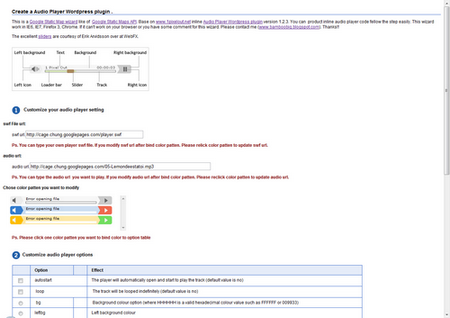
So, i wirte some javascript to support a similar simple UI-dirven way to generate Audio Player Wordpress Plugin. Just 3 steps and few settings. You can get the beautiful audio player.

Explain:

The Audio Player WordPress Plugin Wizard is Google style like. Build All by whole javascript and use excellent sliders are courtesy of Erik Arvidsson over at WebFX. The simple UI-dirven way let you can build your player look easily and only 3 steps.

Audio Player Color Schema:

As you can see. There are 9 color you can change.

Step1: Customize your audio player setting


First, you have 3 things to do. Choose the Audio Player Plugin play.swf url and choose the auido file url you want to embed in your blog (This 2 items have default, if you want test first and don't mind it). Then, there are 3 color schema patten. Choose one and you will see the colors bind to table of step2.

Step2: Customize audio player options of colors, autoplay and loop


After the color schema binded. I set autoplay and loop field are ture. If the player url and audio file url are current. Now you will listen to the music. In this step, you can change the color of palyer you want. Click the ratio button of option column. The color picker will be setting to equal the option color you click. You can change the color by darp the red, green and blue or type the html color hex code directly. The player will update if you any change the color, autoplay, loop setting and.

step3:Generate audio player embed code


Now, you can copy this code to embed in you blog.

enjoying~~~


2009/01/02

Feed media:thumbnail Item

1/02/2009 10:22:00 PM Posted by Unknown , 1 comment

In my early two posts(I,II). I talk about Blogger in Draft new features, the Geotagging. There are many blogger discuss the new feature in comments of New feature: Geotagging by Blogger In Draft. Now, maybe you don't understand that this post i will talk about feed item and why i will remind it.

If you had read the post of blogger draft new feature. You will notice that the author offer a Gagdet(here). It's add a google map in you blogger that parser feed georss:point data of your post feed. And i found Blogger Developers Network announced a feature about media:thumbnail(here). It's talk about you can get a 72x72 pixel image in your feed if you add first image in your post. Those give me a idea. I modify my blog template that just list the post if you click the older post link in the footer of blog.
<b:if cond='data:blog.pageType == &quot;index&quot;'>
<!-- Show article title only -->
<div class='thumbnail_'>
<table>
<tr>
<td>
<script expr:src='&quot;/feeds/posts/default/&quot; + data:post.id + &quot;?alt=json-in-script&amp;callback=GetThumbnail&quot;'
type='text/javascript'>
</script>
</td>
<td>
<h3 class='post-title' id='list-title'>
<a expr:href='data:post.url'>
<data:post.title/>
</a>
<h2 class='date-header'>
<data:post.dateHeader/>
</h2>
</h3>
</td>
</tr>
</table>
</div>
<b:else/>
<b:include data='post' name='post' />
</b:if>


function GetThumbnail(json) {
var url = (typeof(json.entry.media$thumbnail) != 'undefined') ? json.entry.media$thumbnail.url : &quot; & quot;
if (url.length & gt; 0) document.write('&lt;img src=\&quot;' + url + '\&quot;/&gt;');
else document.write('&lt;img src=&quot;https://blogger.googleusercontent.com/img/b/R29vZ2xl/AVvXsEhsPeUmlIKKTCkO4u4w42SdR4ph9rwh6IgI53ESBC232pBzD8nlNbOZdUk-P5KtJh73TLP_fRMU_HR3CIY-vNDYriqFSfX2un2HH-mKa_w-iChRdLCYoCU3n0rbEPcfOOHMPdyxMxIkQyc4/&quot; /&gt;');
}

The above code. javascript code pass one feed by pass data:post.id and execute callback functionGetThumbnail to write the image url.

get your blogger thumbnail←←