It is old news. Scott Guthrie announce that Microsoft will be shipping jQuery with Visual Studio going forward. It's a good news for developer of ASP.NET. We can use lightweight open source javascript library to do more rich interative application in the client side. It's a important feature that Visual Studio 2008 support full javascript support. And few days ago, microsoft had release a hotfix for a number of issuse in Visual Studio 2008. You can make Visual Studio's javascript intelliense work better with jQuery.
scenario
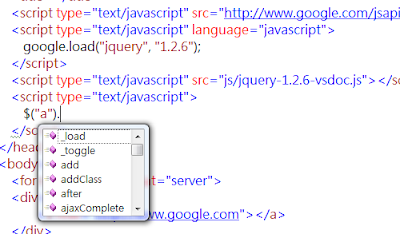
Ps. About web page import javscript, usually we direct asign script block src attribute. Another method, we can use Google AJAX Libraries API load jquery file. It's more convenience to load jquey library by Google AJAX Libraries API. For example: you can change jquery library version by modify aip parameter.
OH! sure. you still can add other js file by Google AJAX API. ex: jqueryui
scenario
- download visual studio hotfox(KB946581) and install
- download jquery intellisense file
Untile now, I search few atrical about jQury intellisense in VS2008. In order to use jQury intellisense. We must download another javascript(jQuery intellisense file). i donwload the intellisense file from(this) before i find jQuery web site support documentation(jquery-1.2.6-vsdoc.js) in Visual studio
- Add both file(jQuery, intellisense) to your web page


Ps. About web page import javscript, usually we direct asign script block src attribute. Another method, we can use Google AJAX Libraries API load jquery file. It's more convenience to load jquey library by Google AJAX Libraries API. For example: you can change jquery library version by modify aip parameter.
//using 1.2.3 version jquery
google.load("jquery", "1.2.3");
// useing 1.2.6 version jquery
google.load("jquery", "1.2.6");
OH! sure. you still can add other js file by Google AJAX API. ex: jqueryui